Speech filtering function
OSKAR uses a unique technology to improve speech intelligibility. Hear human voices much more clearly while distracting background noise is minimised.
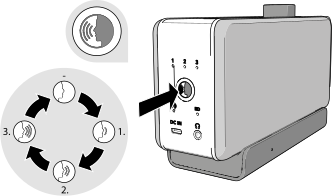
- Each press of the speech filtering button switches to a different voice enhancement mode and shows the current mode via the speech filtering indicator . A higher level makes voices easier to distinguish.
- To switch voice enhancement off, press the speech filtering button repeatedly until none of the speech filtering indicators remain lit.
Note:
OSKAR was developed primarily for people with hearing loss. Please note that the overall audio quality changes as you increase voice enhancement.