AUX
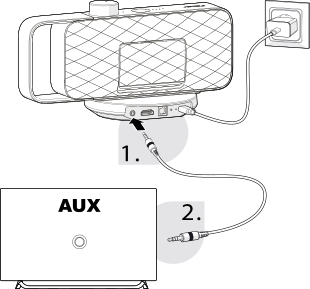
- Connect one end of the 3.5 mm audio cable to the AUX connection on the back of the base station .
- Connect the other end of the 3.5 mm audio cable to the headphone or AUX audio output on your TV.
- Open your TV's audio settings and, depending on the TV model, set the sound output to the AUX connection or the connected headphone/audio output. Set the TV volume to a medium level so that sound can be transmitted to OSKAR at a sufficient volume.
- Set the TV volume to a medium level to ensure that the audio signal is transmitted to OSKAR at a sufficient volume.
For more information on adjusting your TV's settings, please refer to your TV's user manual.