Headphones
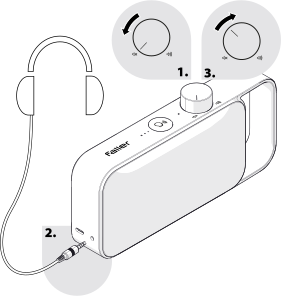
For private enjoyment of TV sound, external headphones can be connected if required.
Speech enhancement is also active through the headphones; OSKAR easy's speaker is disabled when headphones are connected.
Note:
We recommend using headphones with an impedance of
32 ohms to ensure an adequate listening level. Headphones with a higher impedance result in a lower listening level.
Before using headphones, set the volume to its lowest level to prevent excessive volume.
- If OSKAR easy is already switched on, turn the on/off/volume control anticlockwise to its lowest setting.
- Connect the headphones' 3.5 mm jack plug to the headphone connection on OSKAR easy.
- Use the on/off/volume control to set the desired listening volume.