Optical (Toslink)
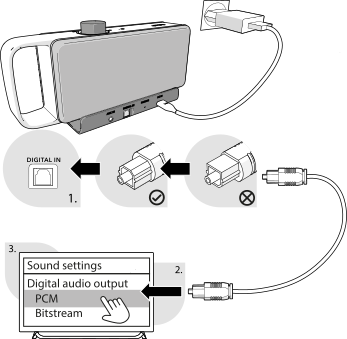
- Remove the protective caps from both ends of the optical audio cable .
Note:
Do not bend the optical audio cable
, as this may damage it.
- Connect the base station and the TV using the optical audio cable . Insert the optical audio cable plug into the DIGITAL IN connection on the base station until it clicks into place.
Note:
The plug has two bevelled edges at the top. Make sure that the cable is connected correctly and without force.
- Set your TV's digital audio setting to PCM output. If it is not set to “PCM”, there may be no sound output. For more information on setting the digital audio output to PCM, please refer to your TV's user manual.
Setting PCM on the TV
The following video shows you how to set PCM on your TV.
Note:
The name of the setting may differ depending on the TV manufacturer and model. For more information about digital audio output and setting it to PCM, please refer to your TV's user manual.
Note:
If your TV does not have an optical Toslink output but has an optical digital connection with a 3.5 mm plug, use the adapter supplied with your TV.