Installation
- Remove the packaging and check the contents.
- Place the base station on a level, stable surface near your TV.
Charging OSKAR
Fully charge OSKAR before first use.
Charging takes approximately 4 hours. Depending on usage, a fully charged battery provides up to 20 hours of operation.
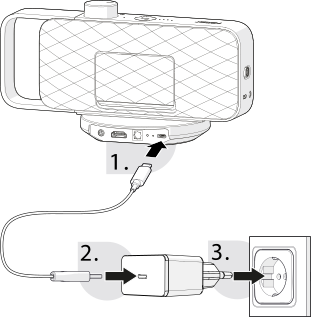
- Connect the USB-C charging cable to the USB-C connection on the base station .
- Connect the other end of the USB-C charging cable to the USB-C power adapter .
- Plug the USB-C power adapter into a mains socket.
- Place OSKAR on the base station to start charging. OSKAR does not need to be switched on during charging.
If OSKAR is switched off, the status indicator pulses white during charging and goes out once the battery is fully charged. If the status indicator lights up red, the battery level is below 20 %. Depending on the volume, OSKAR can then be used for approximately another 2 hours. Recharge it afterwards.
Connecting OSKAR
OSKAR's base station can be connected to the TV via HDMI (ARC), optical Toslink or AUX. We recommend the HDMI (ARC) connection.
If several cables are connected, the base station automatically selects the input in the following order: HDMI, Toslink, AUX.
OSKAR's base station offers several options for connecting to a TV.