Quick Start Guide
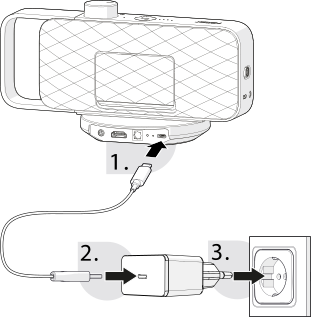
1. Charging OSKAR 2
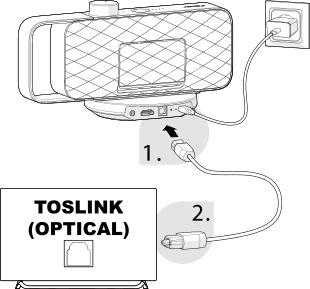
2a. Toslink
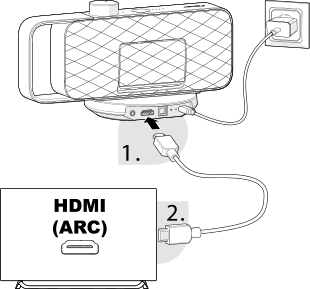
2b. HDMI (ARC)
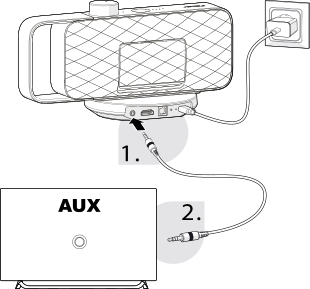
2c. AUX
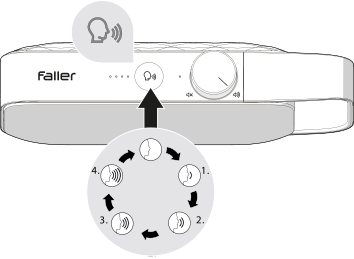
3. Selecting the speech filter
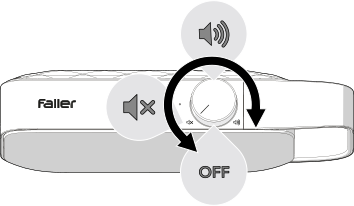
4. Switch on and adjust the volume
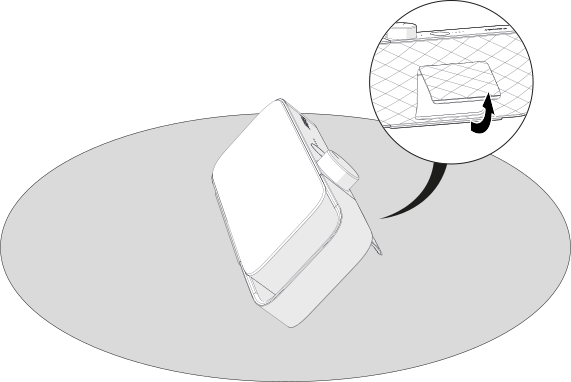
5. Folding out the stand
Connect the USB-C charging cable to the USB-C connection on the base station. Connect the other end of the USB-C charging cable to the USB-C power adapter. Plug the USB-C power adapter into a mains socket. Place OSKAR on the base station to start charging.
Remove the protective caps from both ends of the optical audio cable. Connect one end of the optical audio cable to the DIGITAL IN connection on the back of the base station. Connect the other end of the optical audio cable to your TV's optical audio output (TOSLINK).
Connect one end of the HDMI cable to the HDMI connection on the back of the base station. Connect the other end of the HDMI cable to your TV's HDMI (ARC) connection.
Connect one end of the 3.5 mm audio cable to the AUX connection on the back of the base station. Connect the other end of the 3.5 mm audio cable to the headphone or AUX audio output on your TV.
Press the speech enhancement button to activate speech enhancement. Press the speech enhancement button repeatedly to cycle through the different levels of speech enhancement.
Turn the on/off/volume control clockwise until you hear a click. Use the on/off/volume control to set a comfortable listening volume.
Fold out the integrated stand and position OSKAR as desired.