Speech enhancement
OSKAR uses a unique technology and algorithm to improve speech intelligibility. You hear voices more clearly while distracting background noise is minimised.
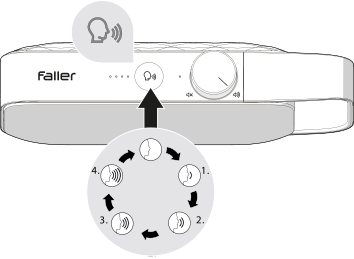
- Press the speech enhancement button to activate speech enhancement. The speech status indicator lights up to show that speech enhancement is active.
- Press the speech enhancement button repeatedly to cycle through the different levels of speech enhancement. The speech enhancement LED shows which mode is active.
Speech enhancement levels

Speech enhancement off
Acoustically optimised TV sound

Low speech enhancement
Optimised for music and news programmes

Medium speech enhancement
Recommended for mild hearing loss

Strong speech enhancement
Recommended for moderate hearing loss

Maximum speech enhancement
Recommended for pronounced hearing loss
Note:
The last enhancement level used is saved when the device is switched off and restored when it is switched on again.