AUX
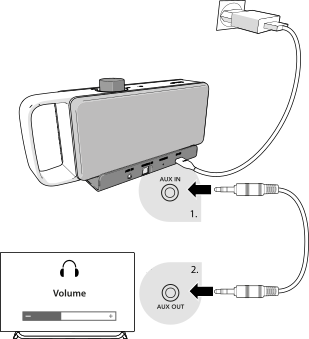
- Connect the 3.5 mm audio cable to the AUX IN input on the base station and to the audio output (headphone socket) on your TV. Push the plug in firmly until it clicks into place.
Normally, no sound is heard from the TV when you connect a cable to its headphone socket. To change this, you need to adjust your TV's settings.
Note:
Set your TV's volume to a medium level so that sound can be transmitted to OSKAR at a sufficient volume. Do not mute the TV, even if you cannot hear sound through its speakers.
For more information about this step, please refer to your TV's user manual.