Operation
Preparation
Once the speech amplifier has been fully charged for the first time (the status LED stops flashing white), the speech amplifier can be removed from the base station and placed at your preferred listening position for use.
Note:
The speech amplifier
can also be charged independently of the base station via its built-in USB-C connection
. In this case, you can charge and use OSKAR at the same time.
Switching OSKAR on
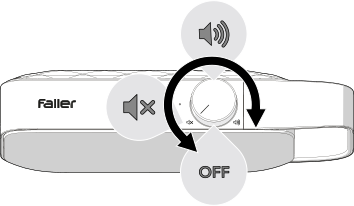
- Turn the on/off/volume control clockwise until you hear a click.
- Use the on/off/volume control to set a comfortable listening volume.
Note:
To reduce power consumption, the base station and OSKAR automatically enter off mode after 15 minutes if the TV is switched off or no audio signal is received. To resume playback, switch OSKAR off and on again.
When you switch OSKAR off, your TV may switch back to its built-in speakers if connected via HDMI.